
Last updated: September 2025
To support a safe and effective prescribing process, we may ask you to upload a recent photo of yourself during your weight loss consultation. This is a clinical requirement that helps our healthcare team make well-informed decisions when prescribing treatments like Mounjaro or Wegovy.
1. Why We Require a Photo
- To verify your identity as part of our clinical governance checks
- To support accurate Body Mass Index (BMI) assessments
- To ensure safe prescribing in accordance with GPhC and MHRA guidance
2. What Your Photo Should Show
Please ensure your photo meets the following criteria:
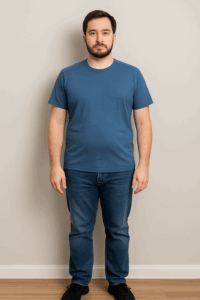
- Full body photo (front-facing): From head to toe, standing straight, ideally against a plain background
- Recent: Taken within the last 2 weeks
- Clear and well-lit: Avoid shadows, filters, or poor lighting
- No obscured features: Do not wear sunglasses, hats, or face coverings
- Neutral posture: Arms by your sides and no exaggerated poses
Please ensure your photos meet the following requirements. These help our medical team verify your identity and ensure you are suitable for treatment:
✅ Full Body Photo (Front-Facing)
A clear, front-facing image of your full body (head to toe), taken while standing straight against a plain background. Make sure it is recent (taken within the last 2 weeks), well-lit, and free from shadows or filters. Avoid sunglasses, hats, or any facial coverings. Arms should be relaxed at your sides.
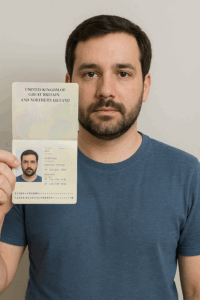
✅ ID Verification Photo
Take a photo of yourself holding your valid photo ID (such as a passport) next to your face. Your face and all details on the ID must be clearly visible in the same frame. This helps us confirm your identity in line with regulatory requirements.
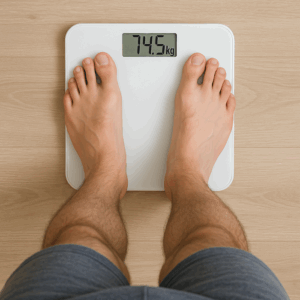
✅ Scales Photo
Take a photo of yourself standing on your scales. The weight reading must be clearly visible and legible. Ensure you’re not wearing heavy clothing and that the photo is taken at eye level with the scale display.
All photos must be recent, clear, and unedited to ensure we can carry out a safe and accurate clinical assessment.
🔎 Please note: All submitted images are also run through AI detection systems to confirm authenticity and prevent fraudulent uploads.
3. Optional Additional Photo
In some cases, we may also request a side-profile image to further support BMI estimation or clinical review.
4. How to Upload
You will be prompted to upload your photo securely during the consultation process. Accepted file formats include:
- JPEG (.jpg)
- PNG (.png)
- Maximum file size: 10MB
5. Data Privacy and Security
All images are stored securely and accessed only by our licensed clinical team. We handle all personal data in accordance with GDPR and our Privacy Policy.
6. Need Help?
If you’re unsure whether your photo is suitable or are having trouble uploading it, please contact our support team. We’re here to help!
- Email: info@everslim.co.uk
Powered by: Everest Pharmacy Hub, 9 Avocado Court, Commerce Way, Trafford Park, Manchester, M17 1HW